How to Connect an Author's Bio to the About Page Template
Wordpress provides an "About Yourself" section that you can fill out for your user account or for other user accounts in your Wordpress installation. This can be accessed from your admin dashboard by going to Users > All Users and clicking on the edit button of a user.
The "About Yourself" section is fairly limited as it provides a basic text box to write your about content. Because of this limitation we decided not to utilize this section by default in our theme and we instead use a custom Elementor template.
Some customers, however, would prefer to use the about content from the user account's "About Yourself" section instead of duplicating this content in the Elementor template. You can do this easily by following the steps below:
- Open the "About Page" Elementor template located in
Templates>Saved Templatesfrom your admin dashboard. - Select the content paragraph in the template.
- On the content editor panel on the left, select the dynamic tags button.
- Select the "Author Info (Bio)" item on the list.
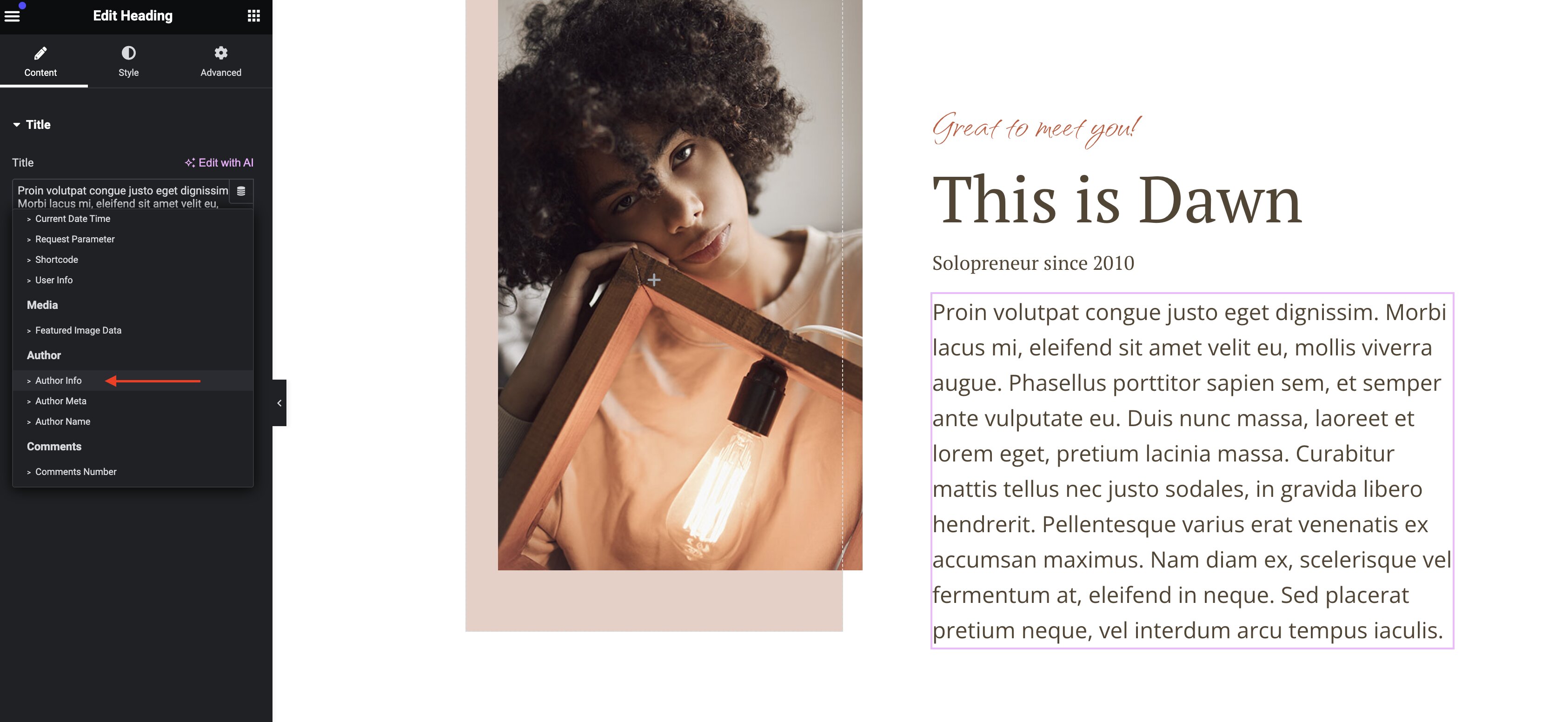
Once selected, the "About Yourself" information should display.
Creating about pages for multiple authors
If you'd like to have about pages for multiple authors, we recommend you duplicate our "About Page" template, one for each author, and use our template's default configuration (without the use of the "About Yourself" user content). This will provide you with the maximum flexibility to support your needs.